Kanban Board Software Comparison 2026: Best Kanban Software for Your Team
Read article
Summary
 15 min.
Kanban board software helps teams visually organize tasks and manage workflows with full transparency. Instead of endless to-do lists, work items are displayed on a digital kanban board and moved through different status columns. Modern kanban software combines this visual approach with the features of project management software, automation, and team collaboration.
In this article, we introduce the most important kanban software tools of 2026, compare their features and pricing, and help you find the right fit for your use case, including the best free kanban software options.
What Is Kanban Board Software?
Kanban board software is based on the Kanban method, an approach to organizing and managing workflows. The term comes from Japanese lean manufacturing and roughly translates to “signal card.” The goal is to make work visible, identify bottlenecks, and keep processes running efficiently.
Kanban boards consist of three core elements:
- Columns — represent process stages or categories (e.g., “To Do”, “In Progress”, “Done” — but priority levels or project phases work equally well)
- Cards — individual tasks or work items
- Boards — the overall view of a project or task management workflow
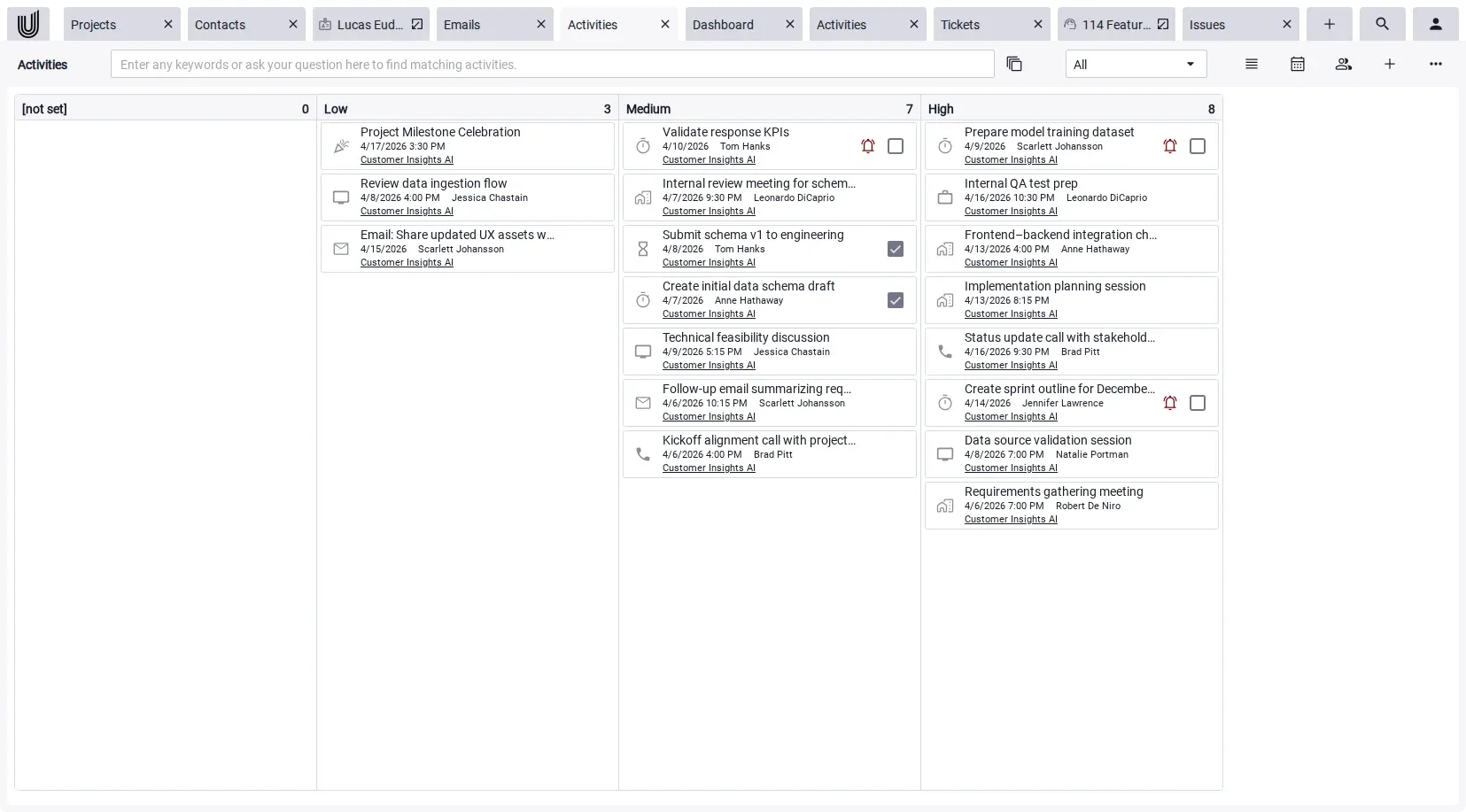
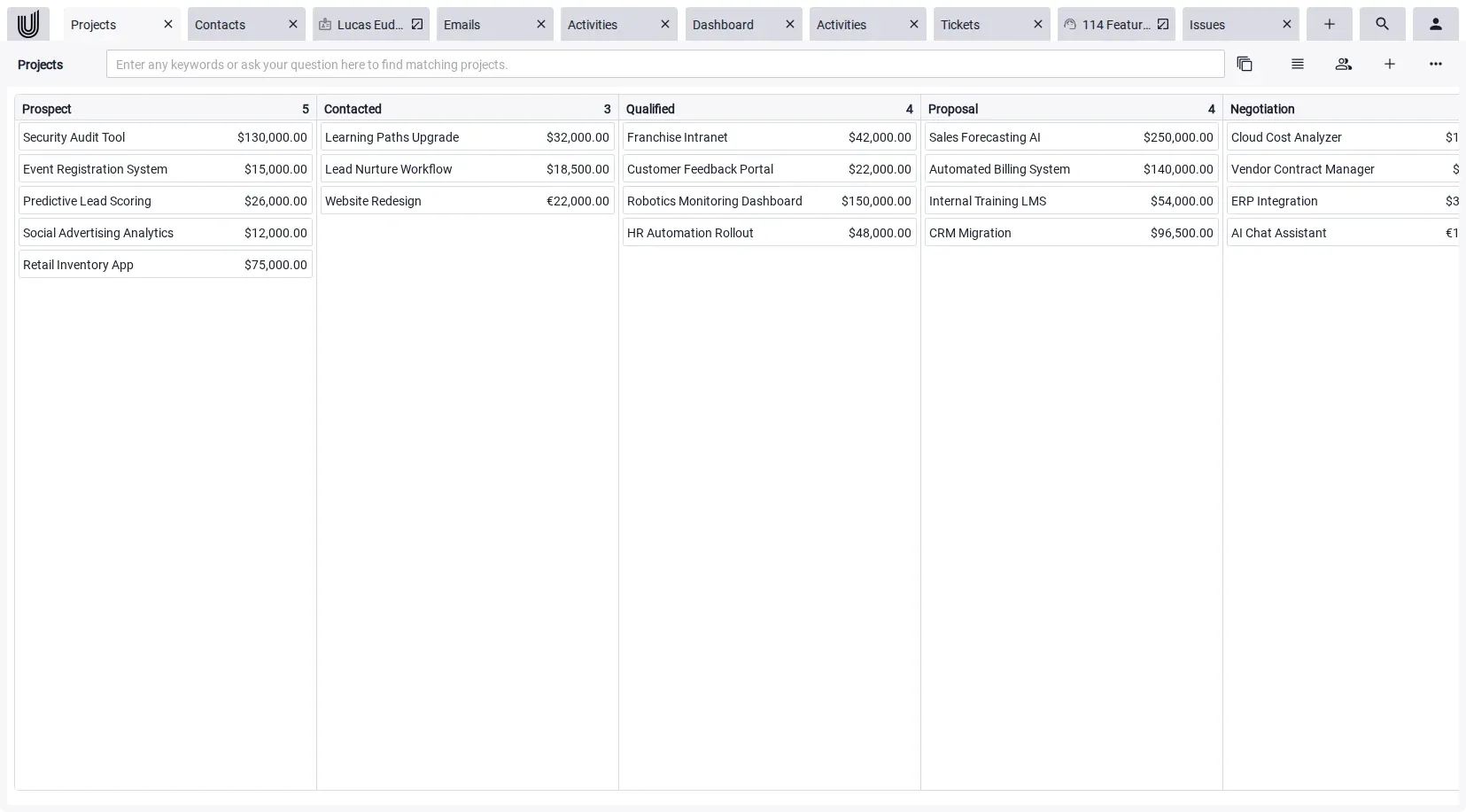
The classic “To Do / In Progress / Done” structure is a common starting point, but far from the only meaningful arrangement. Columns can just as effectively represent priority levels (e.g., Low, Medium, High, as used in Unusual Suite for task management), or project status phases for higher-level project tracking. The right column structure always depends on the workflow you actually want to visualize.
Kanban software builds on this principle and helps teams structure their tasks and workflows. The clear visual layout makes it immediately obvious which tasks are open, in progress, or completed, which is why kanban works across a wide range of use cases, from project management to marketing to customer support.
How Does Digital Kanban Board Software Work?
Digital kanban board software translates the classic physical Kanban board into a software environment — and extends it with powerful additional features. Tasks appear as cards and move through status columns as work progresses. Teams can drag and drop cards in real time to reflect current status. Modern kanban software adds comments, file attachments, reminders, automations, and integrations on top of that core workflow.



Agile Kanban Software: How Kanban Fits Into Agile Teams
Kanban is one of the core frameworks in agile project management and a natural companion to methods like Scrum. Unlike Scrum, which organizes work into fixed sprints, kanban agile software focuses on continuous flow and limiting work-in-progress (WIP). This makes it particularly effective for teams that deal with unpredictable workloads, ongoing support tasks, or frequent priority changes.
Many software teams use agile kanban software like Jira or Linear to manage their backlogs, visualize workflow stages, and track cycle times. But kanban isn’t limited to development: marketing teams, operations, and customer service teams increasingly use kanban board software to bring agile thinking into their daily work. The key advantage is simplicity — no sprint ceremony overhead, just a clear visual system that shows exactly what needs to happen next.
Comparison of the 12 Best Kanban Software Tools in 2026
The overview below covers the most important solutions currently available. All pricing was verified in April 2026 and refers to the lowest paid plans billed annually. Prices may change; always check current terms on the vendor’s website.
| Software | Best For | Price from (per user/month) | Biggest Strength | Biggest Weakness |
|---|---|---|---|---|
| Trello | Beginners, small teams | Free / $5 | Extremely easy to get started | Limited reporting and scalability |
| Asana | Teams, project management | Free / $10.99 | Dependencies & Gantt view | Kanban is not the main focus |
| Monday.com | Visual project control | Free / $9 | Flexible workflows & great UX | Gets expensive as teams grow |
| Jira Software | Dev teams, agile workflows | Free / $7.91 | Deep agile reporting | High complexity |
| ClickUp | Teams of all sizes | Free / $7 | Enormous feature set | Steep learning curve |
| Linear | Software teams, startups | Free / $10 | Blazing fast UI, great for engineers | Primarily for technical teams |
| Notion | Knowledge management | Free / $9 | Docs & kanban in one tool | Limited for complex project management |
| Wrike | Mid-size to large teams | Free / $10 | Workload & capacity planning | Less intuitive UI |
| Airtable | Data-driven, flexible teams | Free / $20 | Spreadsheet + kanban hybrid | Complex setup, pricey at scale |
| Businessmap | Enterprise | $6.50 – $11 | Portfolio control & flow analytics | Complex & expensive |
| Miro | Workshops, visual planning | Free / $8 | Best-in-class visual whiteboard | Not a full task management tool |
| Unusual Suite * | SMBs, integrated processes | Free / $29 | Kanban + CRM + invoicing in one | Less known; highest entry price in comparison, because of all-in-one approach |
💡 Tip for small businesses
If you need kanban alongside CRM, time tracking, and invoicing in a single system, Unusual Suite is worth a look — built specifically for small businesses and service providers.
Best Free Kanban Software: Top Tools with Free Plans
If you’re just starting out or working with a tight budget, free kanban software is a great entry point. Several leading tools offer genuinely useful free tiers:
- Trello — free for individuals and small teams, unlimited cards, up to 10 boards per workspace
- ClickUp — free plan with generous task and storage limits, includes kanban views
- Jira — free for up to 10 users, includes full kanban and scrum boards
- Linear — free for up to 250 issues, great for small engineering teams
- Notion — free for individuals, includes kanban database views
- Miro — free for up to 3 boards, ideal for workshops and visual planning
- Asana — free for small teams, includes basic kanban board view
- Unusual Suite — free plan for individuals available, with no restriction in functionality
Free kanban software typically covers the basics well: boards, cards, and status columns. As your team grows or your workflows become more complex, you’ll likely need paid features like automations, advanced reporting, integrations, or more storage.
Detailed Kanban Software Reviews
Trello – The Classic Kanban Board Software for Beginners
Trello is one of the most widely recognized kanban software tools in the world, known for its ease of use. Tasks are displayed as cards on a board, moved via drag-and-drop, and enriched with checklists, file attachments, or due dates.
- Extremely intuitive — ready to use in minutes
- Generous free plan for individuals and small teams
- Large ecosystem of integrations (Power-Ups)
- Gets cluttered quickly with complex projects
- Limited reporting and analytics
- Advanced features locked behind paid tiers
Pricing: Free (individuals), Standard from $5/user/month, Premium from $10/user/month, Enterprise $17.50/user/month (April 2026)
Best for: Freelancers, small teams up to 5 people, simple workflows
Not ideal for: Teams with complex projects and many task dependencies
Asana – Structured Project Management with Kanban View
Asana is primarily a project management software that also includes a kanban board view. Its strength lies in structured projects with dependencies, milestones, and clear ownership.
- Excellent task dependencies and project structure
- Multiple views: list, board, timeline, calendar
- Strong reporting capabilities
- Kanban is not the primary focus
- Steeper learning curve than simpler tools
Pricing: Free (small teams), Starter from $10.99/user/month, Advanced from $24.99/user/month (April 2026)
Best for: Small teams and agencies with structured projects, Gantt needs, and dependencies
Not ideal for: Teams looking for a pure, lightweight kanban board
Monday.com – Visual Project Management with Maximum Flexibility
Monday.com combines an appealing interface with highly customizable workflows. The kanban board is one of many available views in a platform built for flexibility.
- Highly flexible, customizable boards and workflows
- Powerful automation capabilities
- Great for visual thinkers and project overviews
- Can get overwhelming with many projects
- Pricing scales up quickly as teams grow
Pricing: Free up to 2 users, from $9/user/month (Basic), from $12 (Standard), from $19 (Pro) (April 2026)
Best for: Mid-size teams with individualized workflows and automation needs
Not ideal for: Very small teams or freelancers (free plan is quite limited)
Jira Software – Agile Kanban Software for Development Teams
Jira is the industry standard for agile software development. Its kanban and scrum boards are deeply integrated into the development lifecycle and offer extensive reporting capabilities, making it the go-to kanban agile software for engineering teams.
- Comprehensive agile reports (burndown, velocity, cycle time)
- Deep integration with GitHub, Bitbucket, and other dev tools
- Highly configurable workflow automation
- Complex setup and administration
- Often overkill for non-technical teams
Pricing: Free (up to 10 users), Standard from $7.91/user/month, Premium from $14.54/user/month (April 2026)
Best for: Software development teams running agile workflows and needing deep reporting
Not ideal for: Small businesses and non-technical teams without a development background
ClickUp – Maximum Feature Depth in One Kanban Software
ClickUp combines kanban boards, Gantt charts, docs, time tracking, and more in a single platform. It’s one of the most feature-rich kanban software solutions available.
- Vast feature set and customization options
- Generous free plan
- Kanban, Scrum, Gantt, and list views in one tool
- Built-in time tracking
- Steep learning curve
- Can feel overwhelming for simple use cases
Pricing: Free (limited), Unlimited from $7/user/month, Business from $12/user/month (April 2026)
Best for: Teams of all sizes who want maximum features from a single platform
Not ideal for: Teams that need a lean, immediately usable tool without a learning phase
Linear – Fast, Focused Kanban Software for Software Teams
Linear is built for speed. It’s a streamlined project tracking tool loved by software engineers and product teams at startups and scale-ups. Its kanban boards, cycles (sprints), and roadmap features are tightly integrated with GitHub and other dev tools.
- Fast UI — minimal friction for daily use
- Excellent GitHub and GitLab integration
- Clean kanban board with cycles and roadmap
- Free plan for small teams (up to 250 issues)
- Primarily designed for technical/engineering teams
- Less flexible for non-dev workflows
Pricing: Free (up to 250 issues), Basic from $10/user/month, Business from $16/user/month (April 2026)
Best for: Software teams, product teams, and startups who want speed above all
Not ideal for: Non-technical teams, marketing, or operations teams
Notion – Knowledge Management with Kanban Functionality
Notion is primarily a workspace for documentation and knowledge management, but it also offers a kanban board view for its databases. It works well for teams that want to combine knowledge and task management in one place.
- Very flexible — docs, wikis, tables, and boards in one tool
- Large template library
- Free plan works well for individuals
- Not a dedicated project management tool
- Gets complex quickly for advanced workflows
Pricing: Free (individuals), Plus from $9.50/user/month, Business from $19.50/user/month (April 2026)
Best for: Freelancers and small teams who want to combine documentation and task management
Not ideal for: Teams that need a full-featured kanban software with notifications, time tracking, or reporting
Wrike – Professional Project Management for Mid-Size Teams
Wrike is a powerful project management platform for mid-size to larger teams. Alongside kanban boards, it offers Gantt charts, workload views, and detailed reporting.
- Excellent workload and capacity planning
- Strong reporting and analytics
- Scales from small to large teams
- Less intuitive than Monday.com or ClickUp
- Often too much for small teams
Pricing: Free (limited), Team from $10/user/month, Business from $25/user/month (April 2026)
Best for: Mid-size to large teams needing workload management and detailed reporting
Not ideal for: Small teams, freelancers, and simple workflows
Airtable – Spreadsheet Meets Kanban Software
Airtable blends the flexibility of a spreadsheet with the visual clarity of a kanban board. It’s popular with data-driven teams who want customizable views and powerful automations without writing code.
- Highly flexible — kanban, grid, calendar, gallery views
- Strong automation and integration capabilities
- Great for content pipelines, product launches, and operations
- Can be complex to configure for new users
- Paid plans are expensive compared to dedicated PM tools
Pricing: Free (limited), Team from $20/user/month, Business from $45/user/month (April 2026)
Best for: Operations, marketing, and product teams that work with structured data
Not ideal for: Teams looking for a simple, affordable kanban board without setup overhead
Businessmap – Enterprise Kanban for Portfolio Management
Businessmap (formerly Kanbanize) is one of the most powerful enterprise kanban software solutions available, designed for large organizations with complex portfolio requirements.
- Advanced analytics: Monte Carlo simulation, cumulative flow, cycle time
- Portfolio-level control across teams and projects
- OKR and strategy alignment features
- High complexity and long onboarding
- Not suitable for small teams — cost and complexity are significant
Pricing: Approx. $6.50 – $11/user/month, enterprise pricing on request (April 2026)
Best for: Large organizations with portfolio management needs
Not ideal for: Small businesses, freelancers, and teams without dedicated process management
Miro – Visual Whiteboard with Kanban Elements
Miro is the industry-leading digital whiteboard platform and includes kanban board templates as part of its visual collaboration toolkit. It’s not a classic task management tool, but it’s excellent for workshops, sprint planning, and visual team collaboration.
- Infinite canvas for free-form visual planning
- Large template library including agile retrospectives
- Excellent for remote workshops and brainstorming
- Not a task management tool
- No due dates, assignees, or time tracking
- Free plan limited to 3 boards
Pricing: Free (3 boards), Starter from $8/user/month, Business from $20/user/month (April 2026)
Best for: Teams that run visual workshops, retrospectives, and collaborative planning sessions
Not ideal for: Teams that need a full kanban software for daily project work
Unusual Suite – Kanban as Part of an Integrated Business System
Unusual Suite takes a different approach from most standalone kanban software tools: the kanban board is part of an integrated system combining CRM, project management, document management, email, and invoicing in one platform.
- Kanban board directly linked to contacts, emails, and documents
- Switch between kanban, calendar, and other views
- Integrated time tracking for small businesses, invoicing, and ticketing system
- Less well known than established vendors
- At $29/user/month, the highest entry price in this comparison — only worth it if you use multiple integrated features
- Not a pure kanban software — it’s an integrated business tool
Pricing: Free plan available, from $29/user/month
Best for: Small businesses and service providers who want kanban, CRM with project management, time tracking, and invoicing in one system
Not ideal for: Teams looking for a standalone kanban board only, and enterprise customers
Kanban Software for Small Businesses and Small Teams
For small businesses and freelancers the decision criteria for choosing kanban software look very different from those of large enterprises. What typically matters most:
1. Simple Onboarding Without Long Implementation Phases
Small teams rarely have time for extended training. Good kanban board software should be intuitive to use and deliver value quickly.
2. Fair Pricing Without Hidden Costs
Most tools charge per user per month. For small teams, costs add up fast. Free kanban software plans from Trello, ClickUp, Jira, Linear, or Unusual Suite are a solid starting point before committing to a paid plan.
3. The Right Features Without Unnecessary Complexity
Feature-heavy platforms like Wrike or Businessmap are often too complex for small teams. The ideal kanban software offers exactly what’s needed.
4. Data Privacy and Security
For teams handling sensitive client data, server location and data privacy standards matter. Look for tools that clearly document their data processing practices and comply with GDPR if you operate in Europe. With European server infrastructure, Unusual Suite meets these requirements.
5. Integration with Existing Processes
What matters is how well the kanban software connects with the rest of your stack, whether via API, native integrations, or as part of an all-in-one software.
Kanban in Project Management Software: In Which Situation Is It Suitable?
Experienced teams switch between views depending on the situation. Kanban board software is most useful for day-to-day status visibility, but sometimes a different view fits better:
| Situation | Recommended View |
|---|---|
| Quick overview of task status | Kanban Board |
| Project planning with dependencies | Gantt chart / Timeline |
| Detailed analysis and reporting | List / Table view |
| Scheduling and deadlines | Calendar view |
| Cross-team capacity planning | Workload view |
Real-World Examples: How Teams Use Kanban Board Software
Example 1: Marketing Agency (5 People)
A small marketing team uses kanban board software to manage client projects. Each campaign gets its own board; columns are “Brief”, “In Production”, “Review”, “Approval”, “Live”. For this use case, software for agencies that connects project tracking with client communication is a natural fit.
Example 2: Freelance Developer
A freelancer uses a kanban board to manage client engagements: new inquiries on the left, completed projects on the right. Each card contains the client contact, project files, and invoicing status.
Example 3: Software Development Team (10 People)
An agile development team uses kanban as an alternative to Scrum. The board shows Backlog, In Progress, Code Review, Testing, and Done. WIP limits ensure even workload distribution — a classic agile kanban software setup.
Example 4: Service Business / Trades (SMB)
A service business tracks jobs through the kanban board: from inquiry to proposal to delivery to billing. Each card links to the client contact and the corresponding invoice.
Manage the full journey from inquiry to invoice in one system
For businesses that want to manage the full journey from inquiry to invoice in a single system, Unusual Suite is worth exploring. It connects a kanban board with CRM and invoicing out of the box.
Try for freeWhen Does Kanban Board Software Make Sense?
Kanban board software pays off when:
- Tasks run in parallel and can no longer be handled in a simple linear sequence
- Multiple people work on the same projects and coordination is needed
- Priorities change regularly and need to be adjusted on the fly
- Transparency across the team is a priority
- You want to spot bottlenecks early, before they become problems
Conclusion: Kanban Software as the Foundation of Modern Teamwork
Kanban board software is far more than a simple task board today. It helps teams make work visible, structure priorities, and manage projects efficiently, whether you’re a freelancer, a startup, or a growing small business.
Simple tools like Trello or Notion work well for freelancers and small teams with straightforward workflows. For structured projects with dependencies, Asana, ClickUp, or Monday.com offer significantly more depth. Software teams running agile workflows tend to reach for Jira or Linear as their kanban agile software of choice. Larger organizations benefit from Businessmap or Wrike for portfolio-level control. For an integrated all-in-one business software with kanban features, opt for Unusual Suite.
Beyond features and usability, integration with existing processes is becoming increasingly important. The right choice ultimately depends on your specific use case and which tool fits your team’s workflow, size, and the way you actually work.
Try an all-in-one platform with integrated kanban workflow
Unusual Suite is an all-in-one software that connects kanban boards, document management, invoicing, time tracking, CRM and project management — ideal for teams who want to consolidate their workflows in a single platform.
Try for freeFAQ: Kanban Board Software
A kanban board is a visual representation of tasks and workflow. It consists of columns and cards representing individual tasks. Tasks move step by step through the columns, so it’s always clear what’s being worked on and what’s already finished. The classic “To Do / In Progress / Done” layout is the most common starting point — but columns can equally represent priority levels (e.g., Low / Medium / High) or project status phases, depending on the workflow.
Creating a kanban board is straightforward:
- Define your key workflow stages
- Create a card for each task or work item
- Assign tasks to the appropriate starting column
- Move cards forward as work progresses
Digital kanban board software adds drag-and-drop, assignees, due dates, file attachments, and centralized management on top of that basic structure. Unusual Suite automatically turns your activities and projects into Kanban boards.
Every kanban board follows the same core principle:
- Columns: represent workflow stages (e.g., Planning → Execution → Review)
- Cards: contain task details including owners, deadlines, and files
- Rules: define when a task moves to the next stage
The key is that the board reflects your actual work process. Only then does it create real transparency rather than additional administrative overhead.
Kanban isn’t the right fit for every situation:
- Less suitable for projects with strictly sequential phases
- Can become cluttered without clear task discipline
- Requires consistent maintenance to stay useful
- Offers limited depth for complex project planning without add-ons
The biggest downside usually comes not from the method itself, but from poor tool selection or lack of team discipline in keeping tasks up to date.
In Unusual Suite, projects, activities, and issues are displayed directly in the kanban board and organized by status or priority. Tasks can be moved via drag-and-drop, while all relevant data — such as contacts, emails, and documents — is linked directly to each task. Note: Unusual Suite is not a pure kanban tool; it’s primarily designed for small businesses that want to consolidate multiple business processes in one platform.
A standalone kanban tool typically solves only part of the problem: visual task organization. In practice, gaps quickly appear because key information lives in other tools — contacts in the CRM, documents in the cloud, and communication in email. The result: constant switching between systems, duplicate data entry, and missing context when you need it most.