Workflow Management System:
Software, Features, and How to Choose
Read article

Summary
 13 min.
In growing teams, processes pile up that no one has documented properly. Who notifies sales about a new order? How does a complaint move from support to production? This is exactly where a workflow management system comes in. It turns implicit routines into visible, repeatable processes and automates the steps that always run the same way.
For small and mid-sized organizations, the value of workflow management software lies less in flashy automation and more in reliable routine: clear ownership, fewer handover mistakes, and a transparent view of open work.
This guide explains what workflow management software actually delivers, where it stops being useful, and what to look for when picking the right workflow management tools. It also covers when a workflow and document management system is the better fit, with concrete feature examples from day-to-day work.
What is a workflow management system?
A workflow management system is software that lets you structure, run, and monitor recurring business processes. A workflow is a defined sequence of steps. A request comes in, it gets assigned, moves through stages, is reviewed, and finally closed. The software maps these steps and makes sure nothing falls through the cracks.
Unlike traditional project management software, which handles individual projects with unique goals, workflow management focuses on standardized, repeatable routines. A project is typically unique, whereas a workflow is repeated consistently over time. The two overlap often, which is why modern platforms tend to combine both.
Typical use cases for software for workflow management include:
- Request and approval processes: vacation requests, travel expense approvals, purchase approvals.
- Ticket and support workflows: intake, classification, escalation, and resolution of customer inquiries.
- Onboarding processes: structured steps for new employees or new customers.
- Data flows between systems: automatically moving records between CRM, calendar, email, and accounting.
- Notifications and escalations: automatic alerts on status changes, missed deadlines, or owner changes.
A system for workflow management is rarely a standalone product today. The functionality often sits inside larger platforms – such as CRM systems, project management tools, or all-in-one BPM solutions.
What does a workflow management system do?
In daily use, a workflow management tool focuses on tasks with clear repeatability. The following areas are especially typical:
1. Mapping and visualizing processes
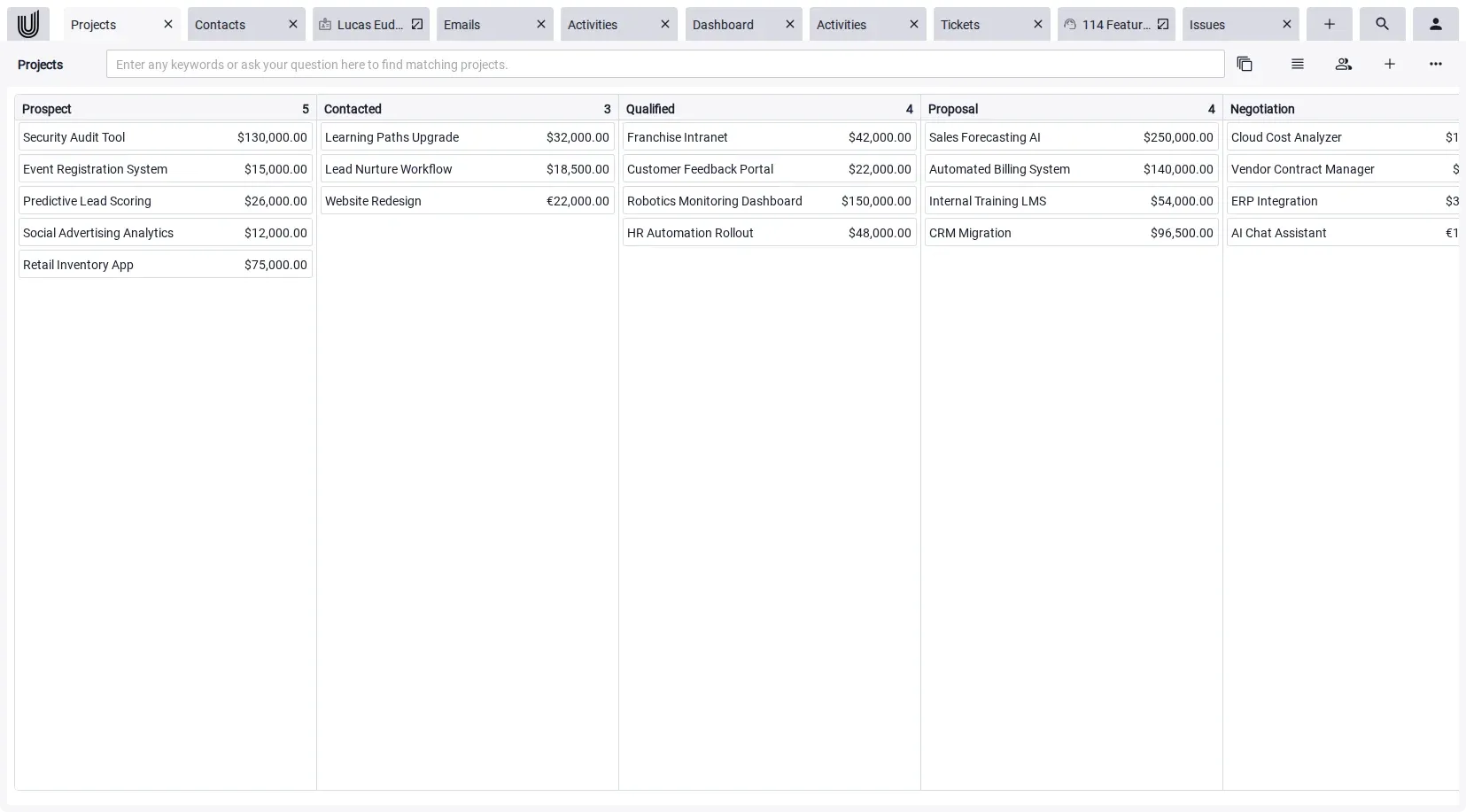
The first step is usually making a process visible in the first place. Workflow management software displays processes as stages, often as a Kanban board where cards move left to right through phases. Every team member can see at a glance what sits in which stage and where things are stuck.
2. Automatically assigning tasks
A typical pattern: when a certain type of request comes in, it gets routed automatically to the right team or person. Tools for workflow management handle that routing based on rules, such as category, customer, or priority. That cuts down on manual sorting and shortens response times.
3. Status changes and escalations
When a task moves into a specific phase, additional actions can fire: a notification to the customer, an entry in task management software, an alert to accounting. If a deadline is missed, the system can escalate, for example by emailing the team lead. Critical work doesn't go unnoticed.
4. Moving data between systems
Many workflows aren't purely internal. They move data between tools: exporting meetings to a calendar, pulling contacts from email, pushing invoices into accounting. A system for workflow management can schedule and run these handoffs, either as a one-off or on a recurring schedule. Modern platforms only sync new or changed records (delta sync), which keeps the load on external services low.
5. AI-driven processing of incoming content
A special form: AI-based workflows that activate the moment new content arrives. Documents are automatically summarized on upload, the document type is recognized, and contained contacts, organizations, and activities are extracted. For incoming emails, the same evaluation can be triggered on demand — the AI summarizes the message, suggests contacts to import, and creates activities when you want it to. Classical workflow tools can't do that at this depth. The work shifts from entering data to checking it, the same pattern seen across AI project management tools.
6. Reporting and analytics
When you run processes in a structured way, you can also measure them. Software for workflow management shows how long each stage takes, where work piles up, and how loaded individual teams are. That's the basis for improving processes step by step, instead of optimizing on gut feel.
Benefits of workflow management software
Day to day, workflow management software delivers several concrete benefits, especially where processes currently live in people's heads, in email, or in spreadsheets:
- Clear ownership: every step has a responsible person. Handoffs stop slipping through the cracks.
- Fewer handover errors: instead of informal handoffs, you get defined status transitions. Information travels with the work item.
- Transparent status view: it's immediately visible what's open, where things are stuck, and what's due soon.
- Reproducible quality: standardized processes ensure every case is handled similarly, regardless of who picks it up.
- Scalability: the more cases you handle, the more value you get. What works manually at 20 cases per month becomes mandatory at 200.
- A data basis for optimization: cycle times and bottlenecks become measurable. That enables targeted improvements instead of guesswork.
Important: these benefits don't come automatically from installing software. What matters is that the modeled processes actually match how the team works, and that the team genuinely uses them.
Limits and risks of a workflow management system
Anyone planning to use a workflow management system effectively should also understand its typical weaknesses:
- Over-engineering: not every routine belongs in a tool. Simple agreements between two people are often slowed down by a rigid workflow system, not sped up.
- Resistance to change: standardized processes can feel paternalistic to a well-functioning team. Without involving the people doing the work, rollouts fall apart fast.
- Maintenance overhead: processes change. Workflows have to be reviewed and adjusted regularly. Otherwise they stop reflecting reality.
- Pseudo-automation: if a workflow just encodes existing problems instead of solving them, it's automating inefficiency. Process analysis comes before the tool.
- Data quality: workflows depend on data. If the data is incomplete or outdated, even automated steps produce unreliable results.
Realistically, software for workflow management delivers the most value where repeatable processes with clear rules already exist. For creative or highly individual work, it stays the wrong fit.
Run workflows directly in your business software
Want to manage recurring routines where your data already lives, not in a separate tool? Unusual Suite combines CRM with project management, tasks, documents, and email in one platform, including configurable workflows for imports, exports, notifications, and more.
Try for freeWorkflow management tools: what to look for
When choosing tools for workflow management, the number of features matters less than the question whether they fit how the team actually works. The following criteria help with the evaluation:
- Integration with existing tools: workflow management software that isn't connected to your CRM, email, calendar, or accounting creates more maintenance work than relief.
- Customization: can phases, fields, and rules be adjusted without developer help? Workflows have to keep up with changing requirements.
- Visual representation: Kanban, list, and calendar views should be standard, ideally switchable on the fly.
- Notifications and triggers: which actions can be triggered? Status changes, emails, tasks, data handoffs?
- Permissions: not everyone should be able to trigger or see every workflow. Roles and profiles need to be granular.
- Data privacy and hosting: where is the data processed? Who has access? For GDPR-relevant processes, this is a hard requirement.
- License scalability: pricing is typically per user and module. Growing teams should understand cost trajectories before the tool is deeply embedded.
Market overview: types of workflow management tools
Tools for workflow management aren't a single product category. Depending on the use case, the providers differ significantly (as of 2026, sample selection per category):
- Task and project-oriented tools: focused on boards, tasks, and tickets, with workflows expressed as status transitions. Well-known options include Jira, Asana, monday.com, and ClickUp. They are quick to roll out and fit agile teams well, but typically don't cover CRM, accounting, or complex process logic in full.
- Integration platforms (iPaaS): connect existing cloud tools to each other, for example by moving data between CRM, email marketing, and accounting. Common providers are Zapier, Make, and n8n. They extend existing systems but don't replace a domain solution like CRM or project management.
- Document management systems (DMS) with workflow capabilities: a document management system with workflow features combines file storage, versioning, and approval routes. Typical providers are M-Files, DocuWare, and OnBase. Strong fit where workflows revolve around documents such as contracts, invoices, HR files, or audits. Less suitable when the work isn't document-centric.
- All-in-one business platforms: bundle CRM, project management, tasks, documents, and workflows into a single application. Examples are Bitrix24, Odoo, and Unusual Suite. Advantage: a shared data foundation.
Which category fits depends on the priority. Teams that mainly need to connect cloud tools are better off with iPaaS; teams whose work centers on documents benefit most from a workflow and document management system; and teams looking for one workspace for CRM, projects, and workflows go with an all-in-one platform.
A small business management software that combines workflow management with CRM and project management in one platform has typical advantages in that last category. The workflows operate on a shared data foundation, handoffs happen inside the system, and no additional integrations are needed.
Practical example: workflows in Unusual Suite
How workflow management looks in practice is best shown through Unusual Suite. The platform defines workflows as repeatable actions that run once or on a recurring schedule, including imports, exports, notifications, and automated cleanup:
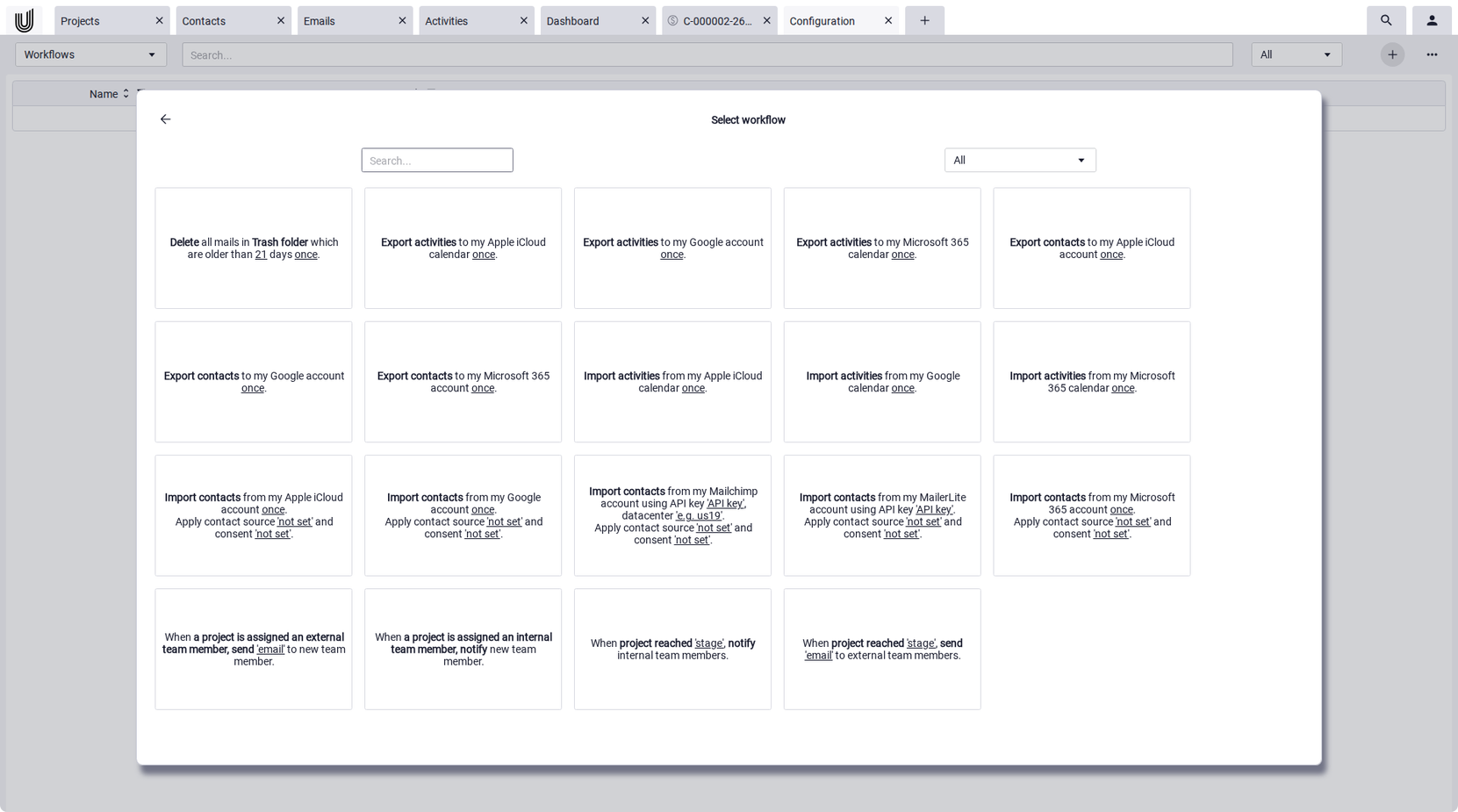
- Import and export workflows: Import workflows pull records from external sources (e.g. contacts from Apple iCloud, Google, Microsoft 365, Mailchimp, or Mailerlite); export workflows push them to Apple iCloud, Google, or Microsoft 365 calendars. The workflows can be activated or deactivated per entry. Only what has changed since the last run is transferred, an etag-like mechanism compares the current state to the previously synced one. Equally important is the safety logic on deletion: an export workflow removes a target record only if Unusual Suite originally created it. Pre-existing records in the target system remain untouched.
- Phase-based workflows on Kanban boards: Projects, activities, tickets, and issues each move through their own phases. These phases are configurable: order, color, and label can be aligned to the actual process. On the Kanban board, records are grouped by phase and can be moved via drag and drop.
- Emails automatically become tickets: A typical inbound workflow: when an email account is linked to a ticket queue, incoming messages land in the support pipeline as tickets automatically. Classification, assignment, and escalation then run according to the configured rules. Manual ticket creation disappears — the process flows seamlessly from the inbox to ticket handling. A shared inbox turns into service desk software for small businesses that way, with nothing left sitting unanswered.
- Create contacts from email signatures: When the option "Process email signatures" is active on an email account, Unusual Suite parses incoming signatures and creates contacts and organizations from them automatically. Sales and support build up clean master data on the side, without anyone having to maintain it manually.
- AI pipeline on documents and emails: When a document is uploaded, the integrated AI generates a summary, recognizes the document type (quote, invoice, purchase order) and extracts contacts, organizations, and activities. The same pipeline runs on incoming email attachments. The user decides which extracted records to import, eliminating the need for manual inbox classification.

How to introduce a workflow management system effectively
Rollouts work better in steps than as one big launch. A pattern that works in practice:
- Pick a process: start with one concrete, clearly scoped routine: vacation approvals, ticket handling, or quote creation. Ideally something that happens often and currently costs a lot of manual effort.
- Make the current state visible: before automating, ask: how does the process actually run today? Who does what, when, with which information? Gaps and shortcuts often surface only here.
- Model the workflow: represent phases, ownership, and triggers in the tool. Stay as close as possible to the existing process at first. Too many changes at once overwhelm the team.
- Activate the workflow: many platforms, Unusual Suite for example, require that a workflow be explicitly activated via a toggle after saving. Saving alone isn't enough; it's a small but common source of mistakes in the first days.
- Pilot and adjust: run the workflow for a few weeks. Which steps work? Where does the team route around the tool? Adjust based on real usage, not the whiteboard.
- Expand step by step: once a workflow runs stably, tackle the next one. Over a few months, you build a coherent process landscape without overwhelming anyone.
Treating a system for workflow management as a tool for specific processes, rather than a universal solution, gets you to usable results much faster.
Conclusion: use workflow management software with focus
Workflow management software isn't a goal in itself. It's a tool for making recurring routines reliable and traceable. The value shows up wherever processes today are spread across email, spreadsheets, and people's heads: in request handling, onboarding, approvals, support, and data handoffs between systems.
At the same time, a workflow management system doesn't replace clear processes. A bad process inside a good tool stays a bad process, just an automated one. The question before the tool is: how should the routine actually look?
In practice, the most useful solutions are the ones that don't offer workflow management in isolation but build it into an existing platform for CRM, project management, tasks, and documents. Where the data already lives, workflows can be added with the least friction.
In the end, what matters isn't how many workflows a tool can theoretically run. What matters is whether the processes people use every day become noticeably easier.
All-in-one platform with integrated workflows
Want to bring processes, tasks, documents, and data handoffs together in one platform? Unusual Suite combines CRM and project management, document management, email, and Kanban boards with configurable workflows for imports, exports, and notifications. See pricing here.
Try for freeFAQ on workflow management systems
A workflow management system is software that lets you structure, run, and monitor recurring business processes. A workflow is a defined sequence of steps with clear ownership, from intake to processing to closure. Typical features are process visualization (for example, as a Kanban board), automatic task assignment, notifications on status changes, and data exchange between systems.
A workflow management system runs on rules. Each workflow has a trigger (a new email, a new record, a schedule), a defined sequence of steps with ownership and phases, and an end state. Once the trigger fires, the case moves through the defined stages. Status changes trigger further actions like notifications, tasks, or data handoffs to other tools. Dashboards or Kanban views show at any time which case is in which phase.
There's no universal answer. The right workflow management system depends on the use case. For agile teams that mainly steer tasks and tickets, tools like Jira, Asana, monday.com, or ClickUp work well. For automating workflows between cloud applications, platforms like Zapier or Make are common. Organizations whose work centers on contracts, invoices, or other documents often need a document management system with workflow features. DocuWare, M-Files, or OnBase are typical here. For small and mid-sized organizations that want CRM, projects, documents, and workflows under one roof, all-in-one platforms such as Unusual Suite are an option. More important than the "best" tool is whether the system covers the processes actually needed, integrates with the existing toolchain, and gets accepted by the team.
Not quite. A document management system with workflow features centers on storing, versioning, and approving documents, with workflow capabilities built around the document lifecycle: review chains, signature routes, retention rules. A general workflow management system models any kind of business process, not just document-driven ones. The two overlap when approvals or contract reviews are involved, which is why some teams pick a workflow and document management system that combines both.
A workflow management system mainly handles structured, recurring work. It maps processes as a sequence of phases, assigns cases automatically, sends notifications on status changes, escalates when deadlines are missed, and moves data between systems (calendar, CRM, accounting). It also reports on cycle times and bottlenecks, which feeds continuous improvement.